

SMTP
A tool for sending individual transactional emails.
Sending workflow
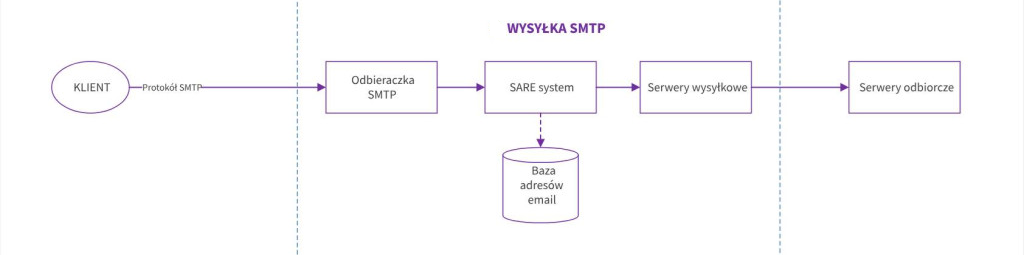
The diagram above shows transactional email sending with statistics. To send emails, create a user in SAREsystem under Advanced -> SMTP.
In SARE, transactional emails refer to messages sent through https://sare.pl/omnichannel-marketing/serwer-smtp/
Configuration
SMTP server address: the server specified in your account
SMTP server port: 587 or 465
Mailbox address/login: [login from the SMTP account]
Mailbox password: xxxxx
Encryption type: STARTTLS or SSL/TLS
Connections to the server use SSL and TLS.
Examples
PHP + PHPMailer
php
$mail->Host       = 'in2.sare25.com';
$mail->SMTPAuth   = true;
$mail->Username   = '[login from the SMTP account]';
$mail->SMTPSecure = PHPMailer::ENCRYPTION_STARTTLS;
$mail->Port       = 587;
Node.js + nodemailer
javascript
const transporter = nodemailer.createTransport({
  host: 'in2.sare25.com',
  port: 587,
  secure: false,
  auth: {
    user: `[login from the SMTP account]`,
    pass: `xxxxx`
  }
});
.NET + MailKit
csharp
var client = new SmtpClient();

client.Connect("in2.sare25.com", 587, SecureSocketOptions.StartTls);
client.Authenticate("[login from the SMTP account]", "xxxxx");
Rust + lettre
rust
let creds = Credentials::new("[login from the SMTP account]".to_string(), "xxxxx".to_string());

let mailer = SmtpTransport::starttls_relay("in2.sare25.com")?
    .credentials(creds)
    .build();